
Financial Reporting
Review the figures.
Understand the context.
Bring income, expenses, owner balances, and recorded payouts into a connected financial view. Review your portfolio by property, owner, and reporting period.
Finance dashboard / Period summary
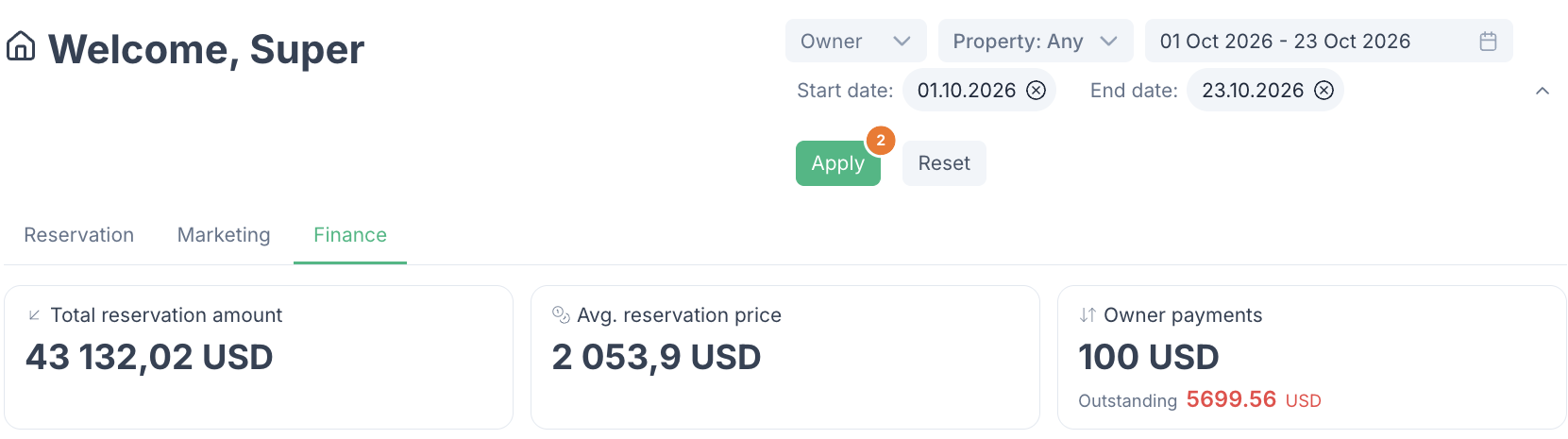
Different questions, connected records
A summary when you need it.
Detail when it matters.
The dashboard gives your team selected financial figures. Reports, statements, and accounting records help explain the activity behind those figures.
Operations
Review income, occupancy, and booking performance by property.
Finance
Review fee and commission reports alongside owner balances.
Management
Review portfolio results and identify the records that need a closer look.
Financial views
The reports behind
your day-to-day decisions.
Income & expenses
Review recorded financial activity for the selected scope.
Owner balances & payouts
Review amounts due and payments recorded in the system.
Occupancy & bookings
Review occupancy and booking performance.
Fees & taxes
Review configured VAT, tourism, cleaning, management, and agent fee records.
Reports are exported as PDF. Tax and fee records reflect the rates configured for the relevant country or region.
How it works
Start with the scope.
Then inspect the records.
01
Choose the scope
Select the property, owner, and reporting period you need.
02
Review the figures
Review the totals and the income, costs, fees, or balances relevant to your task.
03
Open the context
Review related accounting records or owner statements to understand the detail.
04
Export the report
Export the report as PDF when you need a document to share.
Before you choose
A few practical questions.
Explore the full platform for the wider picture of reservations, property records, and financial workflows.
Can reports be exported?
Yes. Reports are exported as PDF.
Are VAT and tourism fee reports available?
The reports section includes VAT and tourism fee reports, along with cleaning, management fee, and agent fee reports.
Does it integrate with accounting software?
There are currently no integrations with external accounting systems.
Can finance staff have their own access?
Team access is managed through roles and permissions. Confirm the access appropriate for each team member during setup.