
Solutions for your working day
How your
property team
gets the work done.
Find unpaid stays, check a villa’s financial records, or prepare apartment arrivals. Choose a situation your team recognises and follow the work in YourResidence.
For professional operators managing properties on behalf of multiple owners.

Choose a situation. Follow the work.
Illustrative workflows for vacation rentals, holiday homes, and serviced apartments.
Pick a situation
What does your team
need to do today?
These examples show how to approach a task, which records to check, and what your team can take away from the work.
Vacation rental managers
Find the bookings that still need a payment follow-up across a multi-owner apartment portfolio.
Holiday home operators
Check the income and expenses behind one villa before reviewing its owner settlement.
Serviced apartment teams
Prepare for arrivals by checking stay dates, assigned apartments, and payment statuses.
Outgrowing spreadsheets?
Explore a move from separate files to connected owner accounting, with a clear view of the setup involved.
For vacation rental managers
Which stays still
need a payment follow-up?
Reservations team · Operations
Example situation
You manage apartments for several owners, with bookings coming from different channels. This morning, your reservations team needs to find the stays whose payment status still needs attention.
How to approach it in YourResidence
- Choose the relevant period in the calendar and narrow the view by property or owner.
- Use the booking-status and payment-status filters to focus on the stays you need to review.
- Open the relevant reservation records and check the guest and agent details before following up.
What your team takes away
Your team can identify which stays need attention while keeping the booking, property, and owner context in view.
What to check on this screen
Focus the calendar with property, owner, booking-status, and payment-status filters.
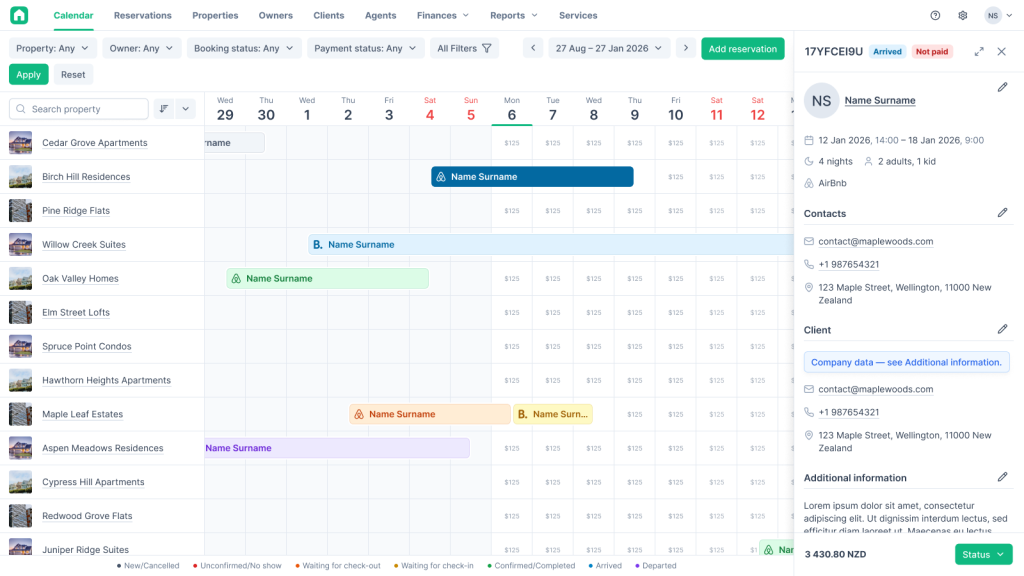
For channel bookings, connectivity through Channex can form part of this workflow; available channels depend on your connection.
For holiday home operators
What belongs in
this villa’s owner settlement?
Finance team · Property manager
Example situation
Before reviewing an owner settlement, your finance team needs to understand the payments and expenses associated with one villa. Start with the property context, then examine the financial records behind the balance.
How to approach it in YourResidence
- Check the villa’s property record and associated owner information.
- Review the property- and reservation-linked income and expenses, including the direction and status of the financial documents.
- Use the owner balance and settlement records to review the amounts and the transactions behind them.
What your team takes away
The settlement discussion has a clear basis: which records relate to the villa, what has been recorded, and which amounts need a closer look.
What to check on this screen
Check the owner balance, filter by property and period, and open the relevant owner statement.
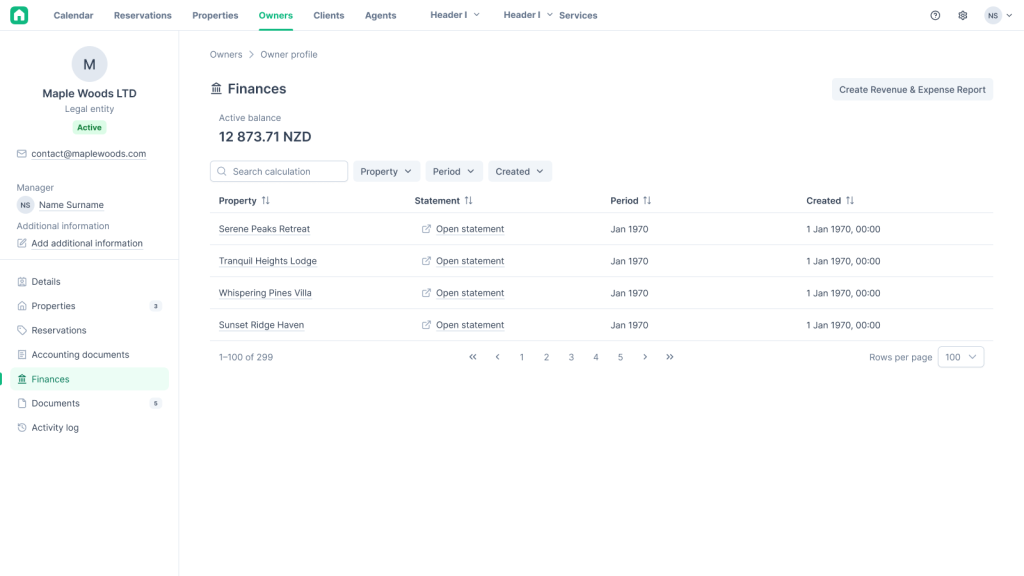
The owner finances view brings the balance and property statement links together. Review the underlying income and expenses as part of the settlement process.
For serviced apartment teams
Who is arriving,
and what needs attention?
Reservations team · On-site operations
Example situation
Your serviced apartment team is preparing for the next set of arrivals. It needs to confirm the stay dates, assigned apartments, and payment statuses before coordinating the day’s work.
How to approach it in YourResidence
- Review the relevant reservations and check arrival and departure dates alongside the assigned property.
- Check reservation and payment statuses to identify records that need clarification.
- Review the guest records and ordered services your team needs as it prepares for the stays.
What your team takes away
The team can see who is arriving, which apartment is involved, and which booking or payment questions need follow-up.
What to check on this screen
Read arrival dates, departure dates, assigned properties, and payment statuses together in the reservation list.
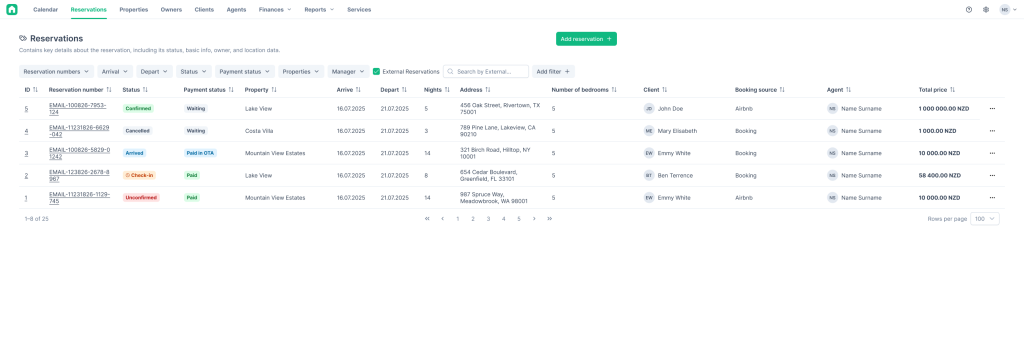
The reservation list gives the office and on-site teams a shared starting point for coordinating arrivals.
Your business, your questions
Find the fit
before you decide.
Discuss the property types, financial records, and team workflows that matter to your business.
Which example should we start with?
Start with the task closest to your current working day: reviewing unpaid stays, checking financial records for a property, or preparing arrivals. Each scenario identifies the records and screens involved.
We manage a mix of property types. Which solution applies?
You can use more than one scenario. For example, a team managing apartments and villas may need the reservation follow-up workflow as well as the property financial review.
Can we walk through our actual process?
Yes. Describe how bookings reach your team, how you allocate property expenses, and how you review owner settlements. We can focus the demo on the relevant screens and records.
What should we prepare for a demo?
Bring an outline of your portfolio, booking channels, team responsibilities, and the task you want to explore. Explain which records you need to check and what makes the process difficult today.
A walkthrough built around you
See how YourResidence
fits your business.
Bring your actual working day to the conversation. We can focus the demo on the screens, records, and processes your team needs to understand.
What would you like to explore?
- Your property types and portfolio size.
- Your booking channels and reservation workflow.
- Your owner accounting and financial records.
- The reports and dashboard figures you want to review.